Posts

NSX ALB LetsEncrypt with DNS-01 challenge - BIND example

    In some of my previous posts, mentioned here LetsEncrypt script integration and Script parameter usage , I explained how useful it can be for NSX advanced load balancing solutions to utilise this kind of approach for free and automatic certificate manipulation, especially in environments with large number of web services inside. This approach utilises HTTP-01 based challenge with LetsEncrypt systems and L7 HTTP/S virtual services on NSX ALB side.     Now, from some time ago there is enhancement in this area, developed by official Avi Networks devops page, in terms of using DNS-01 challenge also. I tried on-prem option using Bind DNS as server which works very well.     Steps are pretty much similar to HTTP-01 option, which can be summarised as following:      - Create L7 virtual service with publicly available FQDN - certificates resolved can be in both options RSA or ECDSA, as configured during creation;        - Do...
NSX ALB (Avi Networks) HTTP policy set removal

     As I wrote on some of my previous posts, Lets Encrypt automation of certs renewal inside NSX ALB (Avi) platform is very useful for Customer environments utilising large number of web oriented services, which needs to be on free HTTPS setup. These blogs about integration could be found here LINK-1 or LINK-2 for DNS based configurations.     What I saw from some operational systems is that,  occasionally, there is small piece left under HTTP policies (for HTTP-01 based challenges), in parent-child setups of virtual services, where HTTP policy is not removed properly from parent virtual service and that prohibits further renewal of certificate when it's needed. Typical removal of that piece is making troubles because it's associated to virtual service and system is not allowing that change.     What's needed is to de-associate problematic HTTP policy set from virtual service and then it can be freely removed from system without any issue. This...

NSX ALB routing - multiple floating IP and BGP setup

Image
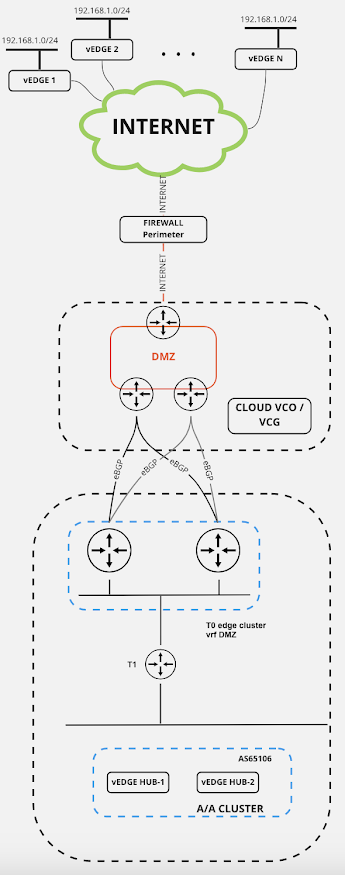
     Recently, I had very interesting scenario around NSX ALB (ex Avi Networks) setup with multiple networks, NAT's and no-NAT's, but more important routing requirement inside Customer environment. As you are aware of - NSX ALB Service engines have multiple NICs - to be more accurate there are 1 management + 9 data interfaces, which can be used with different configurations depending on actual needs and infrastructure. In my specific case, there were following assumptions which were successfully deployed across virtual service configuration: - external network (from NSX ALB perspective) - based on Cisco ACI SDN solution, where basically different L3-outs (specific ACI setup) for multiple NSX ALB needs were configured directly on Cisco platform. For this purpose, we will introduce VRF named XYZ, specifically created for connections mentioned above; - there is a need for multiple floating IP + BGP config in place on NSX ALB SE's, which can be found on this link  Defaul...

VMware SD WAN (Velocloud) on prem lab guide

Image
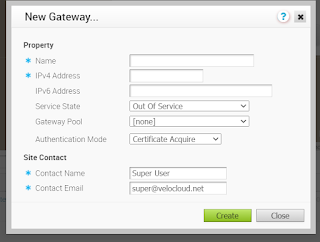
    For the purpose of lab playground and explore on different features from VMware SD WAN (ex Velocloud) solution, it's possible to relatively easy deploy required solutions inside demo environments. Full on prem production infrastructure requires use of VMware professional services for proper deployment and installation, with cloud based as most preferred option by vendor itself.     Setup requires a couple of OVA files for deployment, like in  typical VMware environments: - vCO - orchestrator, for the purpose of configuration and management plane, - vCG - gateway, for the purpose of control plane function, - vCE - edge, data plane establishment and possibly the only hardware piece in SD WAN setup (also available as OVA of course).     Successful setup comprises next steps: 1) classic OVA deployment of vCO and vCG components - vCO/vCG. For vCO and vCG you have option to dedicate 1 or 2 interfaces for the purpose of communication with external/in...

VMware SD WAN - multiple locations - LAN IP address space overlapping with NAT

Image
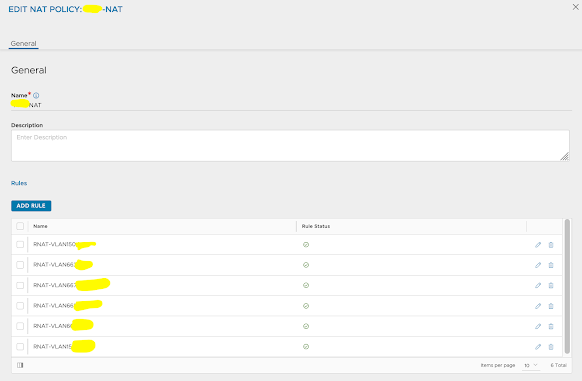
     Different scenarios are possible in terms of routing, NAT-ing and IP overlapping setups using VMware Velocloud SD WAN technology in Customer environments.      Recently I had an PoC with my Customer for the on-prem option with this VMware solution, where different use cases were interesting to show and demonstrate - one of them is something I would like to share and it relates to possibility of LAN-side NAT on Edge (branch) locations, with purpose to have IP overlapped on these setups. Next picture is showing typical Hub&Spoke setup where it can be possible to make this type of configuration: Picture 1. VMware SD WAN lab on-prem environment     Basically thing which needs to be accomplished is appropriate NAT solution for LANs on every branch Edge which are and needs to be the same (192.168.1.0/24 in this example) - as it is shown on Picture 1.      Honestly speaking, NAT is not one of so powerful things insi...

NSX ALB (Avi) BGP scaling using ECMP and RHI

Image
    NSX ALB (ex Avi Networks) solution supports different methods for scaling inside data plane, providing required resources in throughput, high availability and scalability vertically and horizontally. In typical scale-out mechanism for virtual service, which btw can be manual or automatic setup, service engines (SE) are added to group and existing VIP (Virtual Service IP) is maintained (scale-in process is of course opposite one). Basically different options are available for these scaling methods, known as: L2 scale-out mode - VIP always mapped to "primary" SE, which implies that "organization" of traffic and sending to others SE's in group is also responsibility of primary SE --> heavier operations and dependency on this node are possible. Return traffic  can go directly from the secondary SE's via the Direct Secondary Return mode or via the primary SE (Tunnel mode).  Direct Secondary Return  (DSR) mode gives option to  return traffi...

VMware NSX - Multi-site design options - recommendations - scenarios

DISCLAIMER - THIS IS REMINDER BASED POST - ALL INFORMATION AVAILABLE AT OFFICIAL MULTI LOCATION DESIGN GUIDE HERE       One of the fundamental scenarios which can be fulfilled using datacenter SDN solution like VMware NSX is capability to implement multisite setup, giving option to Customer to utilise multiple DC locations over any L1/L2/L3 inter site link with larger MTU support because of overlay encapsulation inside NSX. Worth mentioning is fact that security, incorporated inside NSX, is also capable to follow multi location logic needed for these type of implementations. There are two main concepts behind multisite setup offered by NSX: NSX Multisite - single NSX manager cluster managing transport nodes in different locations, and NSX Federation - introduced from NSX v3.x, with 1 central global management cluster (global manager) and 1 NSX manager cluster per location (local manager). In this article I will follow up on design decisions and recommendation...

NSX-T Application Platform - setup and deployment with vSphere TKGS/NSX-T/self-signed Harbor

Image
     With the introduction of NSX-T v3.2 new option is present inside environment - NSX Application Platform (NAPP), with main purpose of delivering NGFW services inside VMware SDN solution (Advanced Threat Protection, NDR, Intelligence, AMP etc.). It's an solution built in modern app way - meaning Kubernetes (k8s) infrastructure must be in place. For that different options are available - vanilla k8s, OpenShift or one option with deep integration in well-known vSphere solution - Tanzu. I would like to separate this, more-less, complicated process in couple of segments, with most interesting points which could maybe help. Environment that I used for play/demo is based on 4-node vSAN environment / vSphere v7 / NSX-T v3.2.1.2 / TKGS for vSphere (k8s  platform) . I - TKGS for vSphere setup 1) Content library creation - place to download required k8s images for supervisor cluster deployment inside vSphere. URL is available:  https://wp-content.vmware.com/...

NSX-T implementation plan / steps overview

     Here I would like to depict summary (main) steps needed for successful NSX-T deployment, in one place, considering versions above 3.x: - NSX manager deployment - OVA, with typical infrastructure services prepared (IP/DNS/NTP/passwords...) - pay attention for GRUB setup (last resort in case ROOT password is lost) - Compute manager creation - interconnection between NSX and vCenter - Deployment of additional NSX managers through NSX manager UI - Cluster VIP setup - Disable user password expiration (root/admin/audit) - per your security policies ( clear user <user> password-expiration ) or change expiration period ( set user <user> password-expiration <days> ) - DRS rules setup for NSX nodes on different servers - Setup of SFTP backup - FIPS compliant server store needed - Setup of LDAP for AAA services - IP pools creation for TEP's - Transport zone creation / Transport Node profile (for ESXi) / Host prep - Transport node profile (for Edge nodes) / Edg...

vSphere Microsoft clustering - RDM & VMDK shared disk option for WSFC

Image
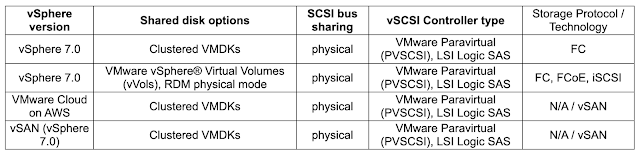
    There are multiple improvements from clustering techniques available to Customers from vSphere 7 and up, giving different options and simplifying actions so that high availability requirements are satisfied. Before v7 you can only rely on different pRDM (physical RDM) options or vVols (VMware vSphere Virtual Volumes), starting with clustered VMDK support on vSAN 6.7 U3.     Starting with vSphere v7.x there is support for  Windows Server Failover Cluster (WSFC) with shared disk VMDK based resources by transparently passing to the underlying storage or emulating on the datastore level SCSI-3 Persistent Reservations (SCSI3-PRs) SCSI commands, required for a WSFC node (VM participating in a WSFC) to arbitrate access to a shared disk.     In summary, from the storage perspective next table is showing current options for sharing purposes in WSFC cluster environments - pay attention that only FC based storage, for clustered VMDK based disk, is supported a...

NSX-T Layer 2 bridging - scenarios & use cases

Image
     Layer 2 bridging is very useful feature of NSX-T, which provides connection to a VLAN backed port group or a device, such as a gateway, that resides outside of NSX-T DC environment. Useful scenarios, among others, are: Workload migration from VLAN-backed to NSX overlay segment, NSX-V to NSX-T migration in Customer environments, Security features leverage using NSX-T Gateway firewall etc. L2 bridging feature requires usage of Edge clusters and Edge Bridge profiles.      Deployments should consider different options, with most important scenarios, for implementation below (this covers Edge VM deployment option as typical use case): Edge VM on VSS portgroup  --> promiscuous and forged transmit on portgroup REQUIRED / ESXi host (with Edge VM) command " esxcli system settings advanced set -o /Net/ReversePathFwdCheckPromisc -i 1 " REQUIRED / Active and Standby Edge VMs should be on different hosts, Edge VM on VDS 6.6 (or later) portgroup  -->...

NSX ALB LetsEncrypt script parameters and usage

     In one of my previous posts about NSX ALB (Avi) and Let's Encrypt integration LINK , I explained how useful could be implementing service like this, especially in Customer environment where large number of different DNS records exist, serving different virtual services using legitimately known and signed digital certificate. Based on main part of this functionality, GitHub script used for certificate management service inside NSX ALB ( LINK - v0.9.7 actual at the time of writing), I would like to show you different options available and useful depending on different use cases and scenarios.     Parameters used by script are well defined and usable inside certificate management configuration on NSX ALB: user / password - self explained and needed by certificate management service for successful run of script. Permissions using custom role defined as  read & write access enabled for Virtual Service, Application Profile, SSL/TLS Certificates and Cer...