Posts

NSX-T Application Platform - setup and deployment with vSphere TKGS/NSX-T/self-signed Harbor

Image
     With the introduction of NSX-T v3.2 new option is present inside environment - NSX Application Platform (NAPP), with main purpose of delivering NGFW services inside VMware SDN solution (Advanced Threat Protection, NDR, Intelligence, AMP etc.). It's an solution built in modern app way - meaning Kubernetes (k8s) infrastructure must be in place. For that different options are available - vanilla k8s, OpenShift or one option with deep integration in well-known vSphere solution - Tanzu. I would like to separate this, more-less, complicated process in couple of segments, with most interesting points which could maybe help. Environment that I used for play/demo is based on 4-node vSAN environment / vSphere v7 / NSX-T v3.2.1.2 / TKGS for vSphere (k8s  platform) . I - TKGS for vSphere setup 1) Content library creation - place to download required k8s images for supervisor cluster deployment inside vSphere. URL is available:  https://wp-content.vmware.com/...
NSX-T implementation plan / steps overview

     Here I would like to depict summary (main) steps needed for successful NSX-T deployment, in one place, considering versions above 3.x: - NSX manager deployment - OVA, with typical infrastructure services prepared (IP/DNS/NTP/passwords...) - pay attention for GRUB setup (last resort in case ROOT password is lost) - Compute manager creation - interconnection between NSX and vCenter - Deployment of additional NSX managers through NSX manager UI - Cluster VIP setup - Disable user password expiration (root/admin/audit) - per your security policies ( clear user <user> password-expiration ) or change expiration period ( set user <user> password-expiration <days> ) - DRS rules setup for NSX nodes on different servers - Setup of SFTP backup - FIPS compliant server store needed - Setup of LDAP for AAA services - IP pools creation for TEP's - Transport zone creation / Transport Node profile (for ESXi) / Host prep - Transport node profile (for Edge nodes) / Edg...

vSphere Microsoft clustering - RDM & VMDK shared disk option for WSFC

Image
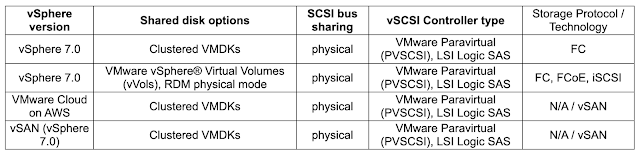
    There are multiple improvements from clustering techniques available to Customers from vSphere 7 and up, giving different options and simplifying actions so that high availability requirements are satisfied. Before v7 you can only rely on different pRDM (physical RDM) options or vVols (VMware vSphere Virtual Volumes), starting with clustered VMDK support on vSAN 6.7 U3.     Starting with vSphere v7.x there is support for  Windows Server Failover Cluster (WSFC) with shared disk VMDK based resources by transparently passing to the underlying storage or emulating on the datastore level SCSI-3 Persistent Reservations (SCSI3-PRs) SCSI commands, required for a WSFC node (VM participating in a WSFC) to arbitrate access to a shared disk.     In summary, from the storage perspective next table is showing current options for sharing purposes in WSFC cluster environments - pay attention that only FC based storage, for clustered VMDK based disk, is supported a...

NSX-T Layer 2 bridging - scenarios & use cases

Image
     Layer 2 bridging is very useful feature of NSX-T, which provides connection to a VLAN backed port group or a device, such as a gateway, that resides outside of NSX-T DC environment. Useful scenarios, among others, are: Workload migration from VLAN-backed to NSX overlay segment, NSX-V to NSX-T migration in Customer environments, Security features leverage using NSX-T Gateway firewall etc. L2 bridging feature requires usage of Edge clusters and Edge Bridge profiles.      Deployments should consider different options, with most important scenarios, for implementation below (this covers Edge VM deployment option as typical use case): Edge VM on VSS portgroup  --> promiscuous and forged transmit on portgroup REQUIRED / ESXi host (with Edge VM) command " esxcli system settings advanced set -o /Net/ReversePathFwdCheckPromisc -i 1 " REQUIRED / Active and Standby Edge VMs should be on different hosts, Edge VM on VDS 6.6 (or later) portgroup  -->...

NSX ALB LetsEncrypt script parameters and usage

     In one of my previous posts about NSX ALB (Avi) and Let's Encrypt integration LINK , I explained how useful could be implementing service like this, especially in Customer environment where large number of different DNS records exist, serving different virtual services using legitimately known and signed digital certificate. Based on main part of this functionality, GitHub script used for certificate management service inside NSX ALB ( LINK - v0.9.7 actual at the time of writing), I would like to show you different options available and useful depending on different use cases and scenarios.     Parameters used by script are well defined and usable inside certificate management configuration on NSX ALB: user / password - self explained and needed by certificate management service for successful run of script. Permissions using custom role defined as  read & write access enabled for Virtual Service, Application Profile, SSL/TLS Certificates and Cer...

NSX-T - useful CLI commands at one place

    In this article I will try to summarize most useful CLI commands inside NSX-T environment, which I personally favorize, so you can quickly make observations/troubleshooting decisions, hopefully in an easy manner with relevant outputs. Now, NSX-T environment and support for CLI comes with many options - many GETs / SETs CLI commands etc. with included option also for   Central CLI   (more on very nice post at this   LINK ) - but here I'm going to put most interesting one, from my perspective, and for sure this list is going to be expanded: - PING test using TEP interface vmkping ++netstack=vxlan <IP>  [vmkping ++netstack=vxlan -d -s 1572 <destination IP>] - example with sending packet with MTU=1572 w/o fragmentation - Enable firewall logging for rules configured inside NSX-T esxcli network firewall ruleset set -r syslog -e true  - enable firewall SYSLOG generation inside ESXi transport node tail -f /var/log/dfwpktlogs.log | grep ...

NSX Edge / Transport node TEP networking scenarios

    During time and different NSX-T versions, different options were available from the perspective of Edge/ESXi Transport node TEP ( Tunnel EndPoint ) networking aspect, which gives multiple options for someone to fulfil even the most demanding scenarios in this area. Some of them gives more flexibility or simplicity, but ultimate goal for functional SDN is always satisfied.     One VMware article gives in summary overview what you can use, plan, and I found it very useful in several occasions as a reminder how something in TEP/VLAN area could be achieved - LINK     In summary, mentioned KB gives following options from TEP networking perspective, comparing Edge nodes and ESXi transport nodes: Edge TEP and ESXi host Transport Node TEP can be configured on the same VLAN in the following configurations: - Edge VM TEP interface connected to a portgroup on an ESXi host not prepared for NSX - Edge VM TEP interface connected to a portgroup on a switch not used by...